
Step 1: Property Setup & Core Integrations
When you log into your new V2 dashboard for the first time, your primary setup tasks will center around your business structure and data connections.
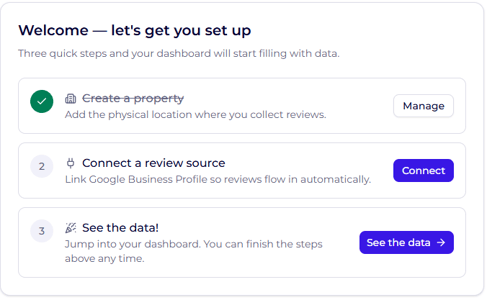
- Create a Property: (Pre-completed) Your initial property is already set up for you. If your business has multiple locations or distinct departments (e.g., restaurants, spas), check our guide on Managing Properties, Clusters and Locations for step-by-step instructions.
- Connect a Review Source: Click Connect on your checklist to go directly to the Integrations section. From here, connect your third-party review platforms (e.g., Google, Booking.com) and your PMS/CRM system.
Note: Once your integrations are active, review and guest data will automatically start flowing into your main dashboard.
Step 2: Essential Platform Configuration
To get the most out of your V2 platform, complete the remaining setup items on your checklist:
- User Management: Learn how to invite team members and set permissions in Managing Users, Roles, and Permissions .
- Guest Surveys: Start capturing direct guest feedback by following Creating and Managing Guest Surveys .
- Competitive Analysis: Monitor market positioning by following Adding Competitors .
- Notifications: Ensure your team stays informed in real time with Setting up Alerts .
- Review Invites: Automate review requests by reviewing Setting up Distribution .
- Website Display: Showcase your reputation on your website with Creating a Widget .
- Automated Analytics: Stay updated on performance by reading Generating and Scheduling Reports .
- Custom Styling: Align guest-facing assets with your brand identity using Adding Your Email Branding .
- AI Reply Customization: Train your AI assistant to sound like your team by Creating Your Brand Voice .