
How the removal feature works
- Eligibility: Only external portal reviews can be deleted using this self-service feature.
- Note: Native Customer Alliance (CA) reviews cannot be deleted manually and still require assistance from our Support team.
- Permissions: All user roles can delete external reviews, except users with Read-only permissions.
- Automatic recalculation: Immediately after you delete a review, the system automatically recalculates all relevant statistics and scores to reflect the removal.
⚠️ Crucial step: Prevent reviews from reappearing
Before deleting a review inside the Customer Alliance platform, you must first delete the review directly on its original external portal (e.g., Google, Booking.com, TripAdvisor).
Why this matters: If you delete the review from Customer Alliance first, our system will simply re-import it from the external source during the next scheduled data sync.
How to delete an external review
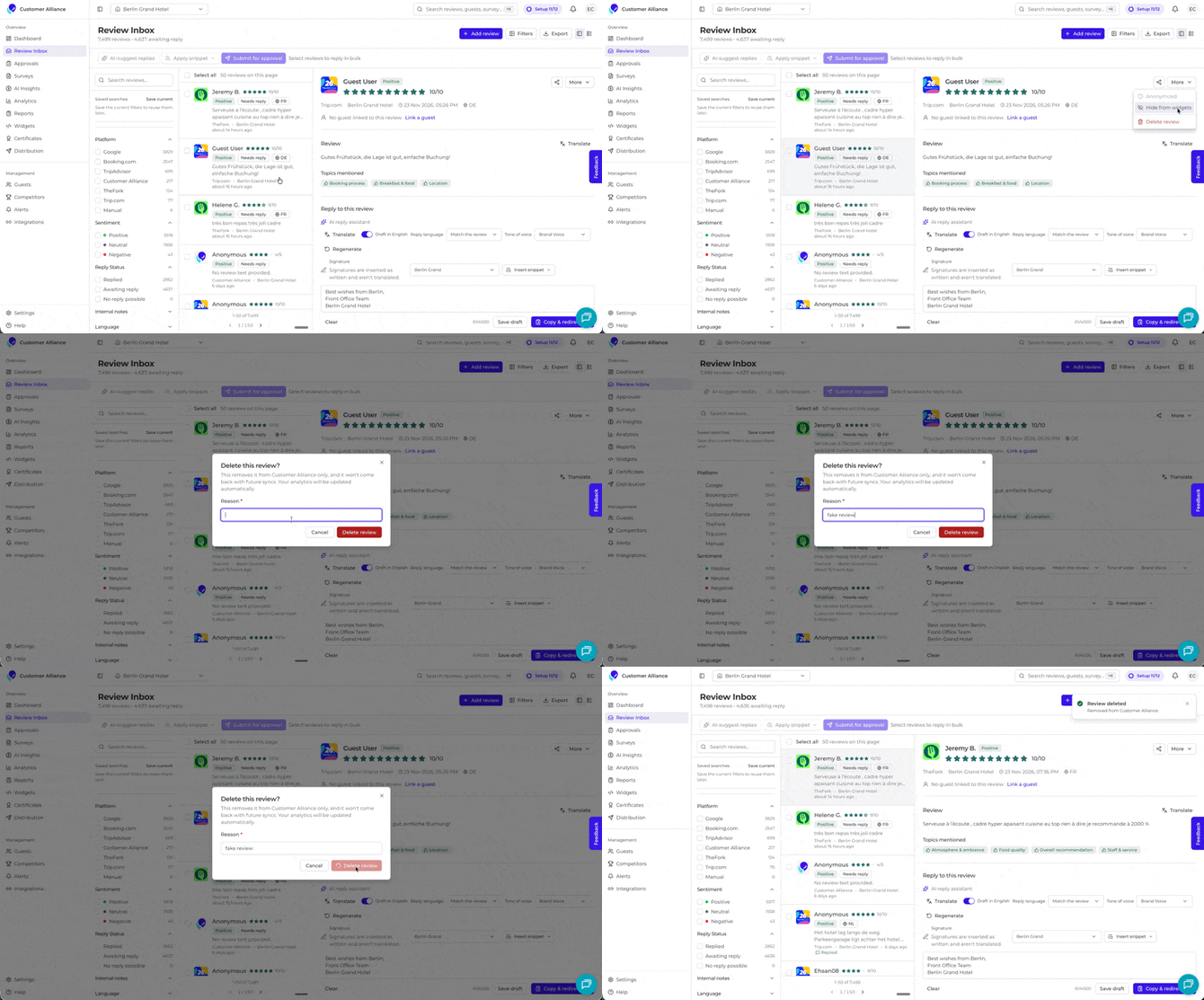
- Locate the review that you want to remove and click More in the top-right corner of the card.
- Select Delete review from the dropdown menu.
- Enter a reason for the removal (for example, "fake review").
- Click Delete review to confirm.
Need help?
If you need to remove a native Customer Alliance review or have questions about managing your feedback, please contact our Support team at
support@customer-alliance.com.