---
title: Managing Your Platform Integrations
description: Managing Your Platform Integrations
---
[Skip to content](https://support.customer-alliance.com/v2-knowledge-base/managing-your-platform-integrations-#main-content)
English
Show submenu for translations
[Open a Ticket](https://support.customer-alliance.com/v2-knowledge-base/kb-tickets/new?hsLang=en) [Customer portal](https://support.customer-alliance.com/tickets-view?hsLang=en)

Open main navigation
Close main navigation
- English
Show submenu for translations
- [Open a Ticket](https://support.customer-alliance.com/v2-knowledge-base/kb-tickets/new)
- [Customer portal](https://support.customer-alliance.com/tickets-view)
- [Contact us](mailto:support@customer-alliance.com)
[Contact us](mailto:support@customer-alliance.com)
How can we help you?
- There are no suggestions because the search field is empty.
1. [Customer Alliance Knowledge Base](https://support.customer-alliance.com/v2-knowledge-base?hsLang=en)
2. [Integrations](https://support.customer-alliance.com/v2-knowledge-base/integrations?hsLang=en)
# Managing Your Platform Integrations
## The Integrations page is the central hub for connecting your digital ecosystem. By linking third-party applications to Customer Alliance, you can automate data syncing, streamline review collection, and integrate guest feedback directly into your existing operational workflows.
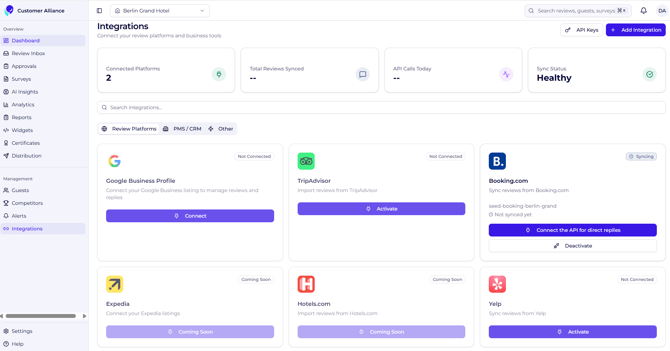
### **1. Types of Supported Connections**
Your integrations dashboard categorizes connections across three core areas of your operation:
- **Review Portals:** Manage direct API connections with major platforms (like Google and Booking.com). For channels without a native API link, you can submit a request directly from this page for our team to evaluate.
- **Core Systems (PMS & CRM):** Connect your Property Management System or Customer Relationship Management tool to automate guest data syncs and trigger survey campaigns based on stay events.
- **Collaboration Channels:** Link communication tools like **Slack** or **Microsoft Teams** to route real-time review alerts directly into your team's active workspaces.
### **2. Accessing and Creating API Keys**
If you need to pull raw data into an external tool, internal database, or custom application, you will need a secure access token.
1. Click the **API Key** button on the main integrations page.
2. You will be redirected to a secure management panel where you can generate a new, unique API key.
3. Copy the generated key immediately and paste it into the backend configuration of your external software.
### **3. Setting Up a New Integration**
Connecting a new software tool to your account is designed to be plug-and-play:
Once authorized, the integration activates immediately, establishing a secure background data pipeline between both platforms.
- [Getting started](https://support.customer-alliance.com/v2-knowledge-base/getting-started?hsLang=en)
- [Settings](https://support.customer-alliance.com/v2-knowledge-base/settings?hsLang=en)
- [Integrations](https://support.customer-alliance.com/v2-knowledge-base/integrations?hsLang=en)
- [FAQs](https://support.customer-alliance.com/v2-knowledge-base/faqs?hsLang=en)
[.svg "Customer-Alliance-Horizontal-logo-on-light (1)")](http://www.customer-alliance.com)
[mailto:email@email.com](mailto:email@email.com)
Copyright © 2026, CA Customer Alliance GmbH