---
title: Competitors
description: Competitors
---
[Skip to content](https://support.customer-alliance.com/en/mazda2/competitors#main-content)
- [English](https://support.customer-alliance.com/en/mazda2/competitors)
- [Czech](https://support.customer-alliance.com/cs/mazda2/competitors)
- [French](https://support.customer-alliance.com/fr/mazda2/competitors)
- [German](https://support.customer-alliance.com/de/mazda2/competitors)
- [Italian](https://support.customer-alliance.com/it/mazda2/competitors)
- [Polish](https://support.customer-alliance.com/pl/mazda2/competitors)
- [Spanish](https://support.customer-alliance.com/es/mazda2/competitors)
English
Show submenu for translations
[Support](https://support.customer-alliance.com/en/mazda2/kb-tickets/new?hsLang=en) [Customer portal](https://support.customer-alliance.com/tickets-view?hsLang=en)

Open main navigation
Close main navigation
- - [English](https://support.customer-alliance.com/en/mazda2/competitors)
- [Czech](https://support.customer-alliance.com/cs/mazda2/competitors)
- [French](https://support.customer-alliance.com/fr/mazda2/competitors)
- [German](https://support.customer-alliance.com/de/mazda2/competitors)
- [Italian](https://support.customer-alliance.com/it/mazda2/competitors)
- [Polish](https://support.customer-alliance.com/pl/mazda2/competitors)
- [Spanish](https://support.customer-alliance.com/es/mazda2/competitors)
English
Show submenu for translations
- [Support](https://support.customer-alliance.com/en/mazda2/kb-tickets/new)
- [Customer portal](https://support.customer-alliance.com/tickets-view)
How can we help you?
- There are no suggestions because the search field is empty.
1. [Mazda Academy/Customer Alliance](https://support.customer-alliance.com/en/mazda2?hsLang=en)
2. [Mazda Academy](https://support.customer-alliance.com/en/mazda2/mazda-academy?hsLang=en)
3. [Chapter 7](https://support.customer-alliance.com/en/mazda2/mazda-academy?hsLang=en#chapter-7)
# Competitors
## Outpace your local market
Congratulations—you have reached the final chapter of your Mazda Academy training! You now know how to set up your profile, track your performance data, engage with reviewers, and establish internal targets.
However, digital retail performance doesn't exist in a vacuum. To truly dominate your region, you need to know how the dealerships down the street are performing.
This final module introduces the **Competitors Touchpoint**. This feature acts as your local market radar, allowing you to track, benchmark, and directly compare your digital performance against local brand rivals without ever leaving your platform.
**Step-by-Step: How to Monitor the Local Landscape**
Keeping a close eye on your local market rivals is entirely automated. Here is how to access and use your benchmarking module:
**1. Navigate to the Competitors View**
Log in to your CEMI platform, select your dedicated **GOOGLE sub-account**, and look for the **"COMPETITORS"** tab on your primary sidebar or evaluation navigation panel.
**2. Review Your Pre-Configured Local Rivals**
To make your experience completely frictionless, your dashboard will display a curated selection of your closest local geographic competitors. You will see their live digital storefront metrics lined up right next to yours.
**3. Track the Critical Benchmark Metrics**
The platform parses rival public data in real-time, giving you a side-by-side view of several crucial battlegrounds:
- **The Ranking Comparison:** See exactly where your star rating sits against rival brands (e.g., how your Mazda dealership stacks up against the local Volkswagen, Hyundai, or Ford stores).
- **Review Volume & Velocity:** Track who is generating customer feedback at a faster rate. A rival with sudden review growth might be running an aggressive campaign that you need to counter.
- **Response Discipline:** Monitor whether your competitors are actively replying to their customers or leaving feedback unaddressed. If they are slow to reply, your swift response times (from Chapter 4) become an instant competitive advantage!
**Competitor Benchmarking Feature**
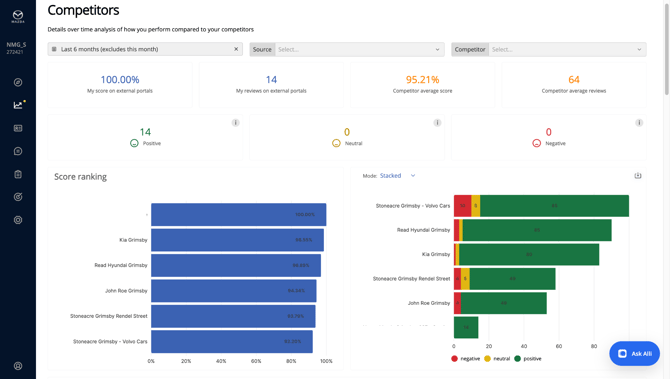
With the competitors section, you can now monitor and benchmark your performance against selected competitors, focusing on brand reputation and dealership satisfaction.
The competitors dashboard can be accessed by selecting the Google subaccount.
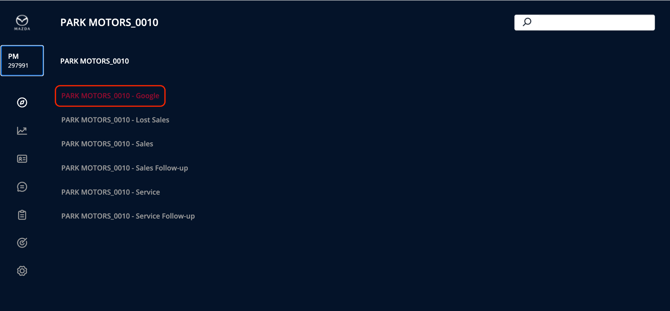
Once inside the Google subaccount, select the section **Analytics 360 \> Competitors** to visualize your competitor benchmarking.
Once you enter the section, you will see the data:
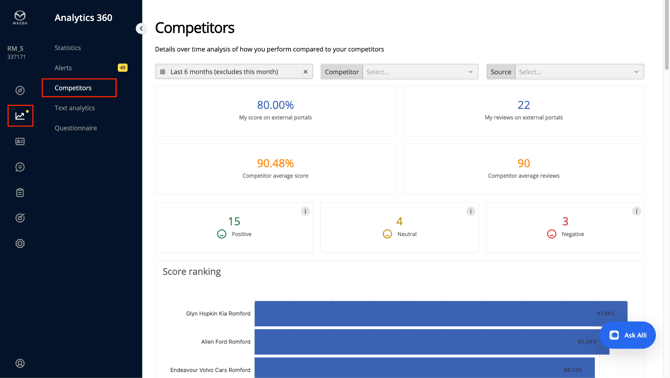
Immediately below the section title, you now have 3 filtering options:
1. **Time Filter:** by default, the time filter is set to “Last 6 months (excluding this month)”. Clicking on this filter will open a drop-down menu with
various subcategories
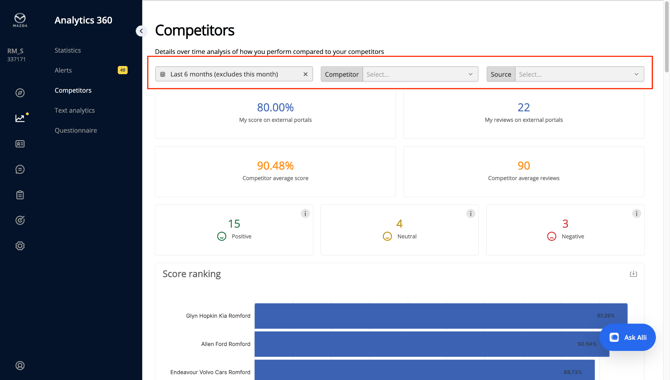
2. **Source Filter:** this field allows you to select the portal from which the data should be taken, such as AutoScout, Google, and others.
3. **Account Filter:** in this final filter, you can select the dealers for which you want to view the data.
Below these filter buttons, you will first visualise the scores of the Public Portals for you and your competitors:
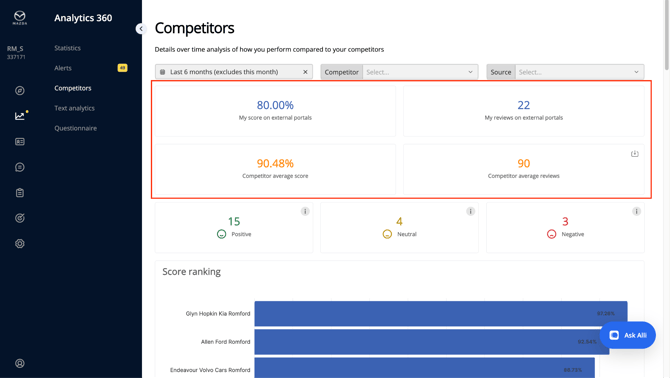
These scores are now also showing the average number of reviews received per the selected time-frame.
A more structured visualisation of these data is shown straight below, under the **Overview section**
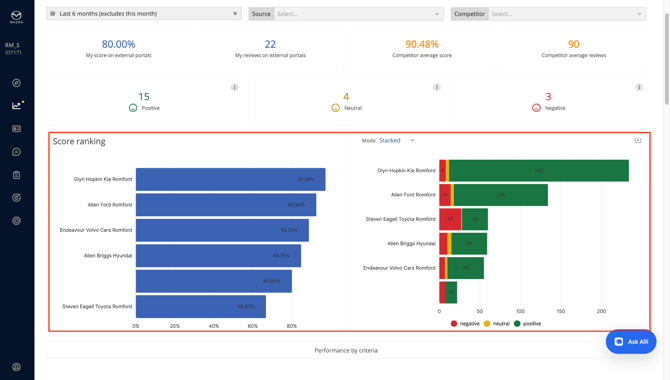
The new competitor’s dashboard now offers a more in-depth analysis for time-sensitive data.
The sources “Score over time” and “Review over time” now have 2 dedicated dashboards with built-in time filtering: Month, Quarter, and Year.
**Score over Time**
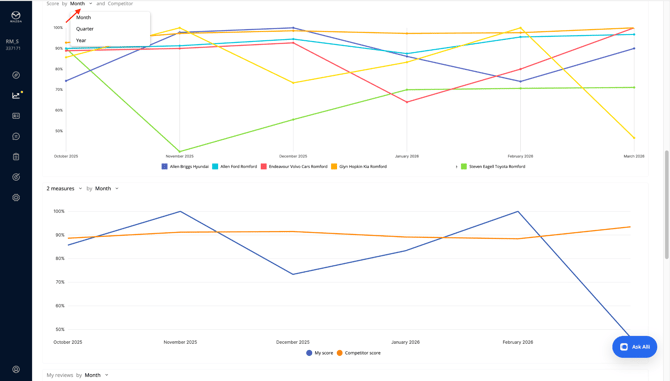
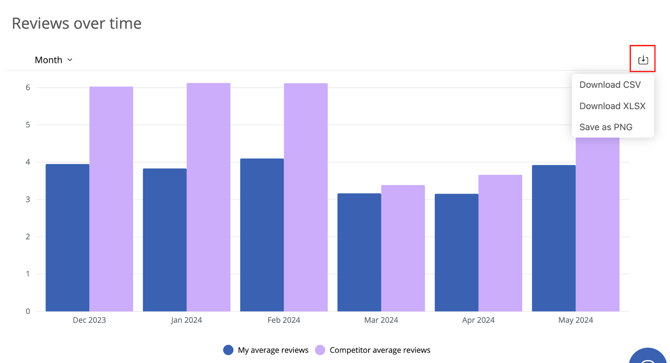
The same logic has been applied for the **Review over time** section, offering now the same filtering regarding Monthly, Quarterly or Yearly data:
**Review over Time**
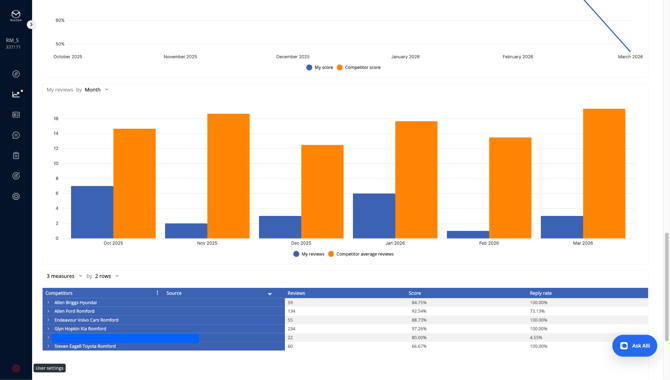
In the final section of this new section, a revised dashboard to recap the data and the source from which the data has been collected from:
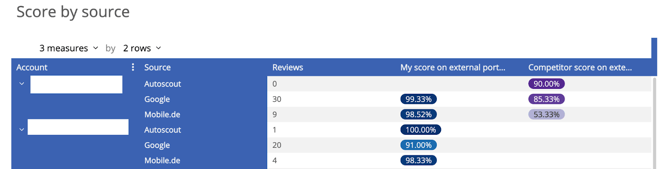
Checking this last section will give you insights on 3 different categories of data:

1. **Reviews**: number of review collected in the selected time-frame
2. **My score on external portals**: your score that CEMI collects and provides in this section coming from public portals such as Autoscout, Google and others, for the selected time-frame
3. **Competitor score on external portals:** the score that CEMI collects and provides in this section coming from public portals sources such as Autoscout, Google for the selected competitors in the selected time-frame
Please note that on the top right corner of every graph or table, you can download the content in various formats, including:
1. CSV
2. XLSX
3. PNS
**💡 How to Turn Competitive Insights into Market Share**
Knowing the score is great, but using it to win is better. Use these strategic habits to stay ahead:
- **Spot the Gaps:** If you notice a local rival's score dropping due to poor service reviews, highlight Mazda’s premium hospitality and efficient service scheduling in your local marketing.
- **Win the "Map Pack" Battle:** Remember, the top 3 spots on Google Maps capture **70% of all clicks**. If a competitor is outranking you locally, use your Chapter 6 internal goals to raise your review volume and push your score past them.
- **Quarterly Check-ins:** Make it a habit to check the Competitors tab at the end of every quarter. Use it to verify that Mazda remains the highest-rated, most responsive automotive choice in your territory.
**🎉 Academy Complete!**
You have officially mastered the 7-part Mazda Academy curriculum. From technical foundation to local market benchmarking, your digital storefront is now optimized for growth.
[](http://www.customer-alliance.com)
[mailto:email@email.com](mailto:email@email.com)
Copyright © 2026, CA Customer Alliance GmbH