---
title: Answering to Comments
description: Answering to comments
---
[Skip to content](https://support.customer-alliance.com/en/mazda2/answering-to-comments#main-content)
- [English](https://support.customer-alliance.com/en/mazda2/answering-to-comments)
- [Czech](https://support.customer-alliance.com/cs/mazda2/answering-to-comments)
- [French](https://support.customer-alliance.com/fr/mazda2/answering-to-comments)
- [German](https://support.customer-alliance.com/de/mazda2/answering-to-comments)
- [Italian](https://support.customer-alliance.com/it/mazda2/answering-to-comments)
- [Polish](https://support.customer-alliance.com/pl/mazda2/answering-to-comments)
- [Spanish](https://support.customer-alliance.com/es/mazda2/answering-to-comments)
English
Show submenu for translations
[Support](https://support.customer-alliance.com/en/mazda2/kb-tickets/new?hsLang=en) [Customer portal](https://support.customer-alliance.com/tickets-view?hsLang=en)

Open main navigation
Close main navigation
- - [English](https://support.customer-alliance.com/en/mazda2/answering-to-comments)
- [Czech](https://support.customer-alliance.com/cs/mazda2/answering-to-comments)
- [French](https://support.customer-alliance.com/fr/mazda2/answering-to-comments)
- [German](https://support.customer-alliance.com/de/mazda2/answering-to-comments)
- [Italian](https://support.customer-alliance.com/it/mazda2/answering-to-comments)
- [Polish](https://support.customer-alliance.com/pl/mazda2/answering-to-comments)
- [Spanish](https://support.customer-alliance.com/es/mazda2/answering-to-comments)
English
Show submenu for translations
- [Support](https://support.customer-alliance.com/en/mazda2/kb-tickets/new)
- [Customer portal](https://support.customer-alliance.com/tickets-view)
How can we help you?
- There are no suggestions because the search field is empty.
1. [Mazda Academy/Customer Alliance](https://support.customer-alliance.com/en/mazda2?hsLang=en)
2. [Mazda Academy](https://support.customer-alliance.com/en/mazda2/mazda-academy?hsLang=en)
3. [Chapter 4](https://support.customer-alliance.com/en/mazda2/mazda-academy?hsLang=en#chapter-4)
# Answering to Comments
## 💬 Engage Directly with Your Customers
In Chapter 3, you learned how to monitor your data and read your customer sentiment metrics. Now, it is time to take action.
Replying to reviews is one of the most powerful ways to build customer loyalty and show prospective buyers how much you care about their experience. Thanks to our direct integration with Google, you don't need to leave your dashboard to do this—**you can read, manage, and publish your replies directly through your CEMI account.**
This chapter will guide you through the stream-lined workflow of answering customer comments directly inside the platform.
In the Mazda CEMI platform, your **Reply Rate (Comment rate)** is far more than a technical metric. It is a digital handshake. In an industry where trust and "Customer Experience" (CX) are the primary differentiators, your response to a review is often the deciding factor for a customer choosing between you and a competitor.
### **Why Replying to Your Customers is Non-Negotiable**
#### **1. It Protects Your Dealership’s Reputation**
When **your customers** leave a review, e.g., in Google, they are speaking to the public. If a negative review sits unanswered, it looks like your dealership doesn't care. By replying professionally, you show potential car buyers that you are attentive and accountable.
#### **2. It Drives Customer Retention (The "Recovery" Effect)**
A dissatisfied customer who receives a sincere, helpful reply is significantly more likely to return than one who is ignored. Replying gives you a second chance to fix a "Service" or "Sales" mistake and turn a critic back into a loyal Mazda advocate.
#### **3. It Boosts Your Local Search Visibility (SEO)**
Google and other search engines prioritize "active" businesses. When you regularly interact with **your customers** through review replies, you improve your dealership's chances of appearing at the top of search results when local drivers search for Mazda sales or service.
#### **4. It Humanizes Your Team**
Buying a car is a deeply personal investment. When you **personally reply to a customer's review or survey feedback**, you prove that there are real people—not just automated systems—reading their words. This "human touch" turns a digital transaction into a relationship, building the emotional connection that leads to long-term loyalty and repeat business for your dealership.
---
### **Managing Your Replies within the Portal**
The CEMI platform provides you with the tools to maintain a high Reply Rate without taking hours away from your showroom floor.
#### **The Review Stream: Your Daily Hub**
Navigate to **Reviews \> Stream**. This is where you see everything **your customers** are saying about you in real-time.
- **Filter by Reply Status (eg, "Not Replied"):** This allows you to focus only on the voices that haven't been heard yet.
- **Filter by "Review Score":** Use this to prioritize 1-star and 2-star reviews that require immediate de-escalation.
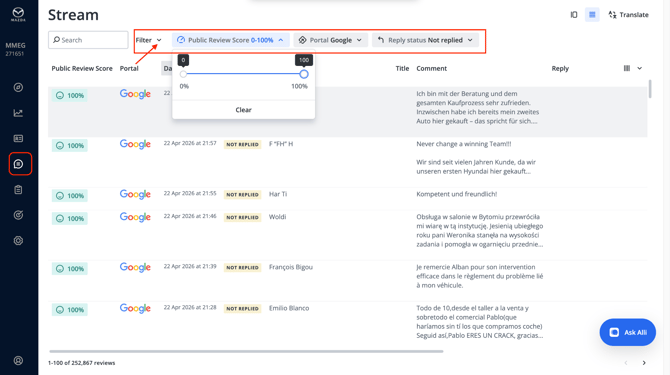
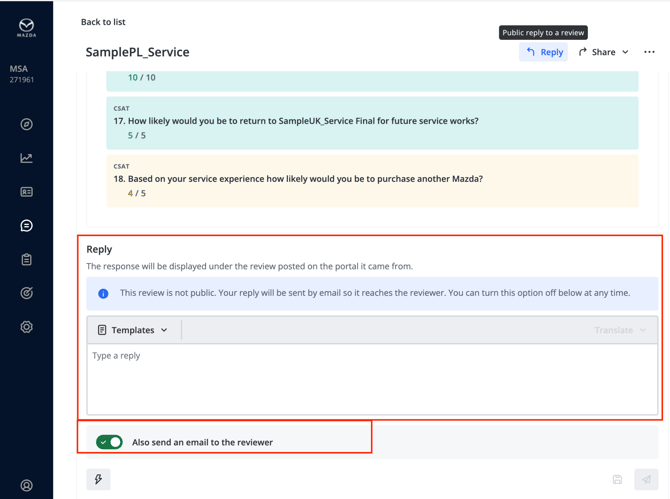
**Centralized Response Management** Whether your customer leaves feedback through an internal Mazda survey or posts a public review on **Google**, the CEMI platform gives you the opportunity to **answer them directly from your dashboard.** When you click "Reply" within the Review Stream:
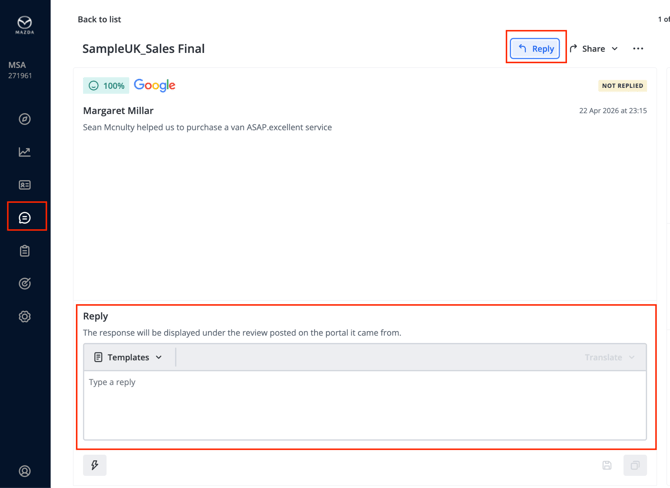
#### **Response Methods Tailored to Your Schedule**
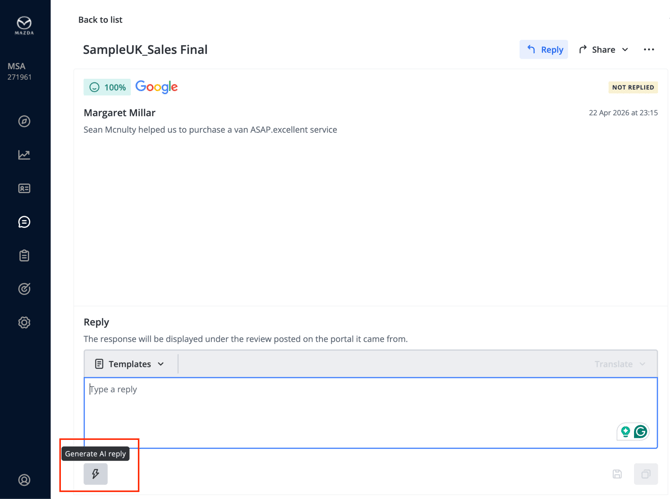
- **AI Reply Assistant:** This is your most efficient tool. It analyzes the specific sentiment of **your customer's** feedback and drafts a unique, professional response in seconds. You can even train it with "Smart Snippets" to include specific dealership info (like your service hours).
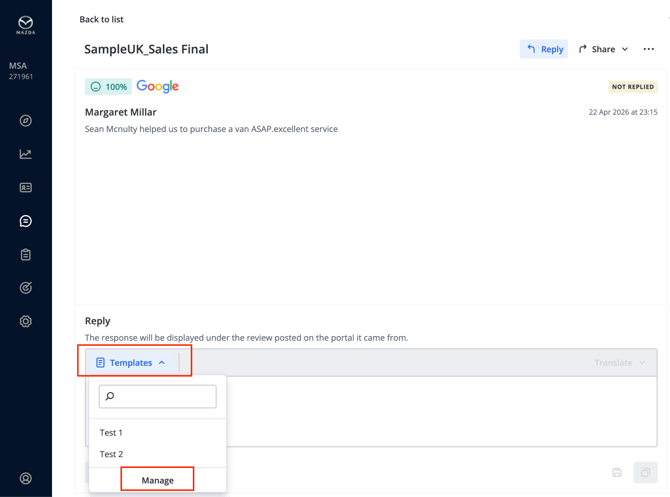
- **Templates:** Perfect for maintaining brand consistency. Use these for standard "thank you" notes to customers who had a great experience in your service department.
- **Direct Email Option:** When replying to internal Mazda surveys, you can check the **"Also send an email"** box. This ensures your message lands directly in **your customer's** inbox, guaranteeing they see your effort to connect.
### **Where to Track Your Reply Rate (comment rate) Performance**
You can’t improve what you don’t measure. To see your current Reply Rate, navigate to these two key areas in the portal:
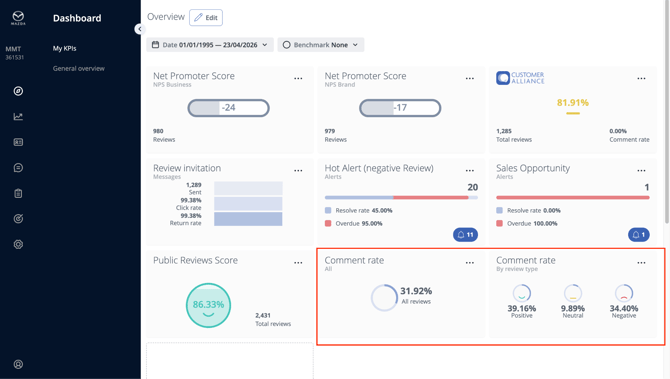
- **The "My KPIs" Dashboard:** On your main landing page, look for the **Reply Rate tile**. This gives you an instant "health check" of what percentage of your total reviews have received a response. It’s the quickest way to see if you are meeting your dealership's engagement goals.
- **Pro Tip:** If you don't see a widget for the **Comment Rate** on your dashboard yet, you can easily add it by clicking the **"+" icon** on the dashboard. This allows you to customize your view so the most important metrics for your dealership are always front and center
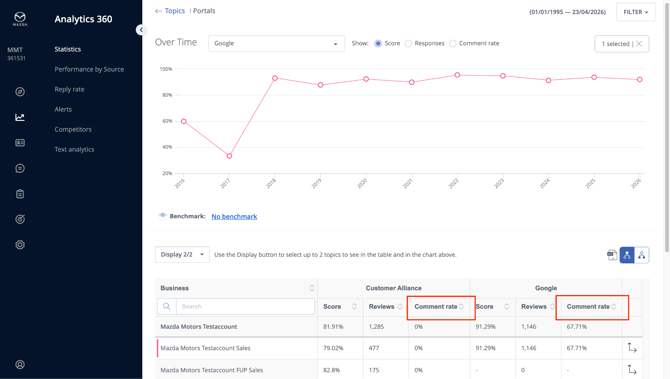
- **Analytics 360 \> Statistics:** For a deeper dive, go to the Statistics section. Here, you can see your Reply Rate broken down by time periods (e.g., this month vs. last month) or by specific sub-accounts like **Sales vs. Service**. This helps you identify if one department is engaging with customers better than another.
### **Setting Your "Reply Rate" Goal**
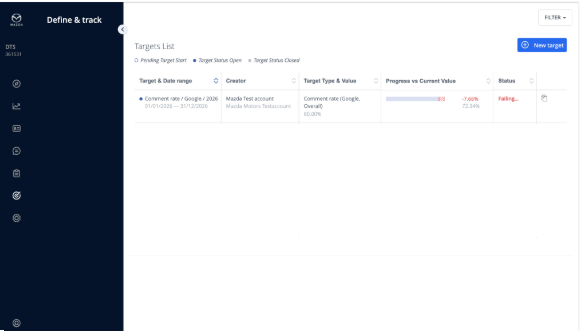
To ensure excellence, we recommend using the **Define & Track** section of your portal to set a formal target.
- **The Gold Standard:** Aim for a **100% reply rate on negative feedback** (1-3 stars) and at least **50% on positive feedback**.
By consistently reaching out to **your customers**, you aren't just managing reviews—you are actively building a more successful, customer-centric dealership.
**Best Practices for Customer Engagement**
To get the highest return on your digital storefront investment, keep these core rules in mind when replying:
- **Be Fast:** Try to reply to new reviews within 24 to 48 hours. A swift response shows customers—and Google's local search ranking algorithm—that your showroom is highly active and attentive.
- **Stay Professional & Grateful:** Always thank the reviewer for taking the time to share their feedback, whether the review is a glowing 5-star compliment or constructive criticism.
- **Keep Brand Consistency:** Ensure your tone aligns with Mazda’s premium hospitality values. A polite, welcoming voice turns casual reviewers into lifetime brand advocates.
**⏭️ Next Up**
While answering positive feedback is highly rewarding, handling negative reviews quickly is critical to protecting your local reputation. Proceed to [**Chapter 5 – Negative Notifications**](https://support.customer-alliance.com/en/mazda2/negative-notifications?hsLang=en), where we will explore the automated alert mechanism that ensures you never miss a critical review.
[](http://www.customer-alliance.com)
[mailto:email@email.com](mailto:email@email.com)
Copyright © 2026, CA Customer Alliance GmbH